



Custom Categories
Create exactly the categories your business needs and update them anytime without disrupting your team.
Auto-Assigned Categories for You
Our AI reads vendor names and items, from receipts — then applies the right category instantly. No repetitive admin work.
Fewer Mistakes
Because categories are applied automatically and consistently, your reports stay accurate.
Every company spends differently. That’s why ExpenseMonkey lets admins create categories that match your exact processes — whether you track by team, client, cost center, or custom internal codes. Update them anytime without disrupting your flow.
With smart auto-categorization, expenses land where they belong the moment they’re submitted.

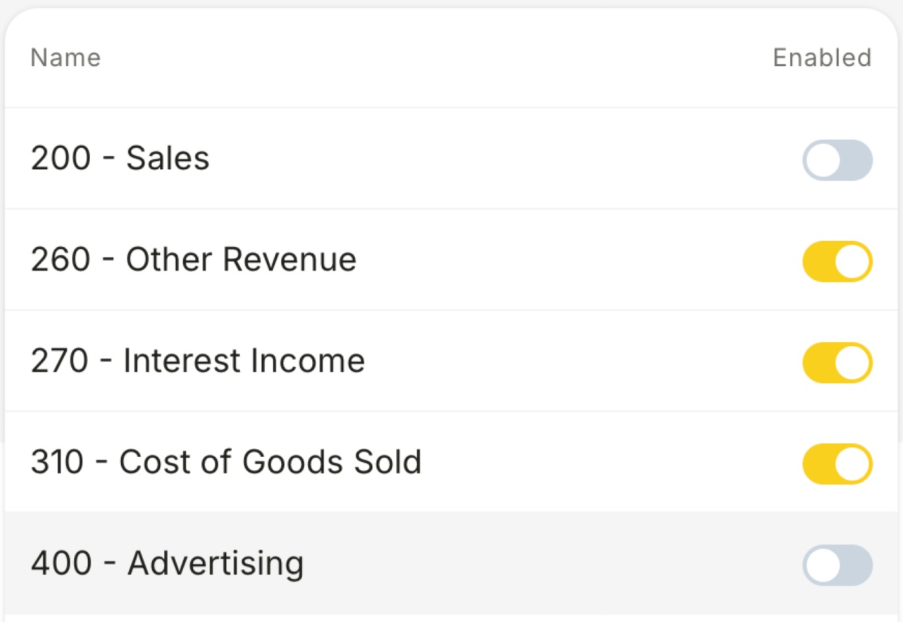
Import your chart of accounts and tax rates directly from Xero, then choose which categories should be visible to your team when booking expenses.
Use your existing chart of accounts or cost categories
Map vendor types to your preferred internal codes
Keep tax, team, and project reporting aligned across tools
ExpenseMonkey’s AI doesn’t just guess — it learns your Xero setup. We auto-categorize receipts using your imported chart of accounts, so your finance team always gets clean, structured data.
Whether it’s travel, software, or marketing, every line item ends up exactly where it should. That means faster closing, fewer errors, and happier accountants.

Yes. Admins can create as many custom categories as needed — by team, client, cost center, or any internal structure. Categories can be edited, renamed, or removed at any time.
Absolutely. Category updates happen instantly and seamlessly. Employees will always see the latest valid list, and previously submitted expenses keep their original category for accurate historical reporting.
Yes. Our AI reads vendor names, item descriptions, and patterns on receipts, then applies the correct category automatically — reducing manual work and errors.
Yes. All your custom categories appear in your reports, filters, and exports. This keeps everything aligned for accounting, client billing, and internal analysis.
Yes. Any custom category you create in ExpenseMonkey is included when exporting expenses to your accounting or reporting tools. Your financial data stays fully aligned with your internal category structure.
Yes. You can organize categories into groups that match how your company works — such as by team, client, or department. This makes it easier for employees to choose the right category and keeps your expense structure clean and intuitive.
Let AI auto-categorize receipts while you stay in control of the structure.
