Create organised tax-ready expense reports in seconds – ideal for billing clients, tax preparation, and business expense reporting. Export your expenses as a CSV file or generate a client-ready PDF report with all receipts included. ExpenseMonkey extracts the data for you, reducing manual work and minimising errors.
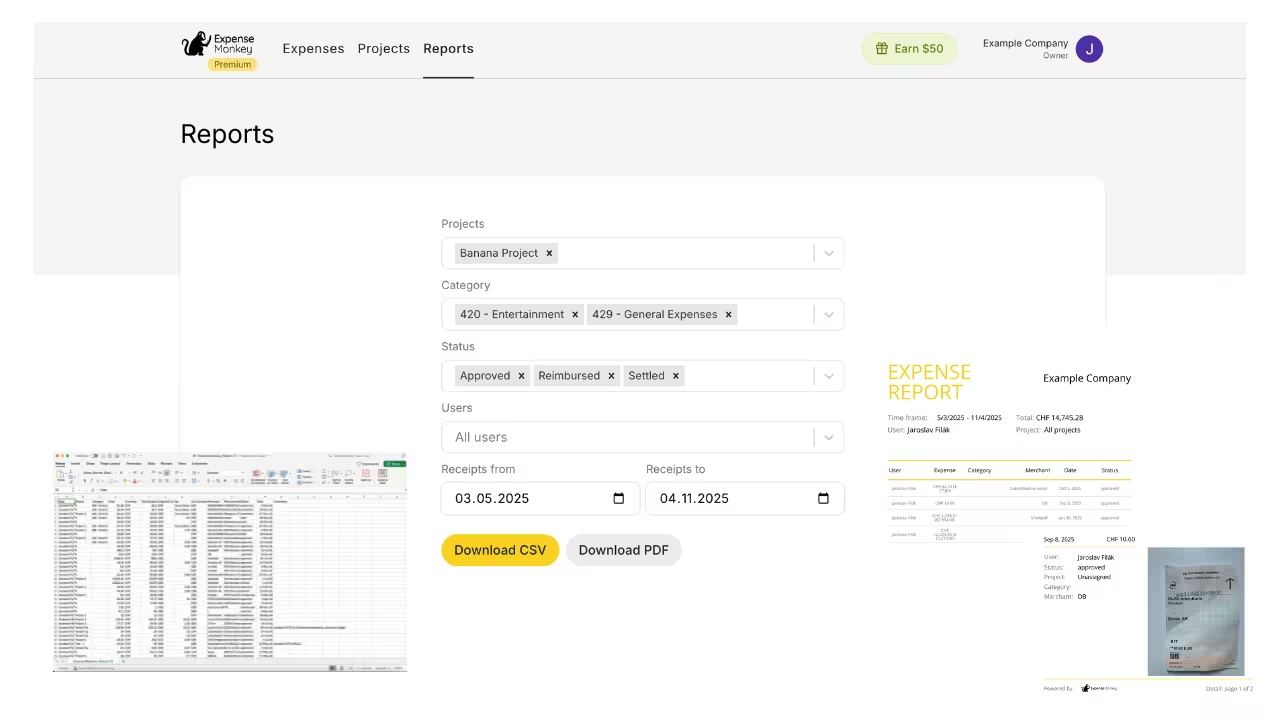
Fast expense reporting
We extract all the key information from your receipts and turn it into organised expense reports in seconds.
Tax filing just a click away
VAT, GST, and sales tax - ExpenseMonkey extracts data from your receipts and adds it to your reports so you never miss it.
Universal compatibility
Download a CSV file of all your expenses or generate a PDF report that’s ready to hand over to clients or accountants.

Quickly bill your clients by summarising all relevant expenses by category, project, or client. Whether you need a detailed breakdown of every expense or a simple total for the month, our reports make it easy to meet even the most demanding client requirements without wasting your time.
“ExpenseMonkey has completely streamlined my billing process. The ability to summarise expenses by category or project and provide detailed breakdowns for clients has saved me hours every month!"

Jared, Company owner
Create detailed expense reports that are ready to upload into your accounting system, simplifying your book keeping and financial tracking
"ExpenseMonkey is a great pre-accounting solution that seamlessly bridges the gap between expense tracking and accounting."

Julia, Accountant

With ExpenseMonkey, you can create profesional expense reports in seconds by categorising expenses, assigning them to projects or clients, and exporting them in a ready-to-share format (CSV or PDF). Click here to watch a video and read more.
Yes, ExpenseMonkey allows you to filter expenses by project or client, giving you a detailed or summarized report tailored to your needs.
Expense reports can now be exported in CSV for maximum flexibility, or generated as a PDF report that’s client-ready and visually polished.
Our tool automatically extracts key details from receipts and organises them accurately, minimising manual entry errors and ensuring reliable data.
Absolutely! ExpenseMonkey provides detailed, well-organised reports that make tax filing easier and ensure you’re prepared for audits or compliance checks.
You can easily export and share reports (CSV or PDF) via email or upload them to cloud services, ensuring seamless collaboration.
